How Long Does DMARC Take to Start Working?
After setting up DMARC, when will you see reports? Learn about DNS propagation, report timing, and realistic expectations.
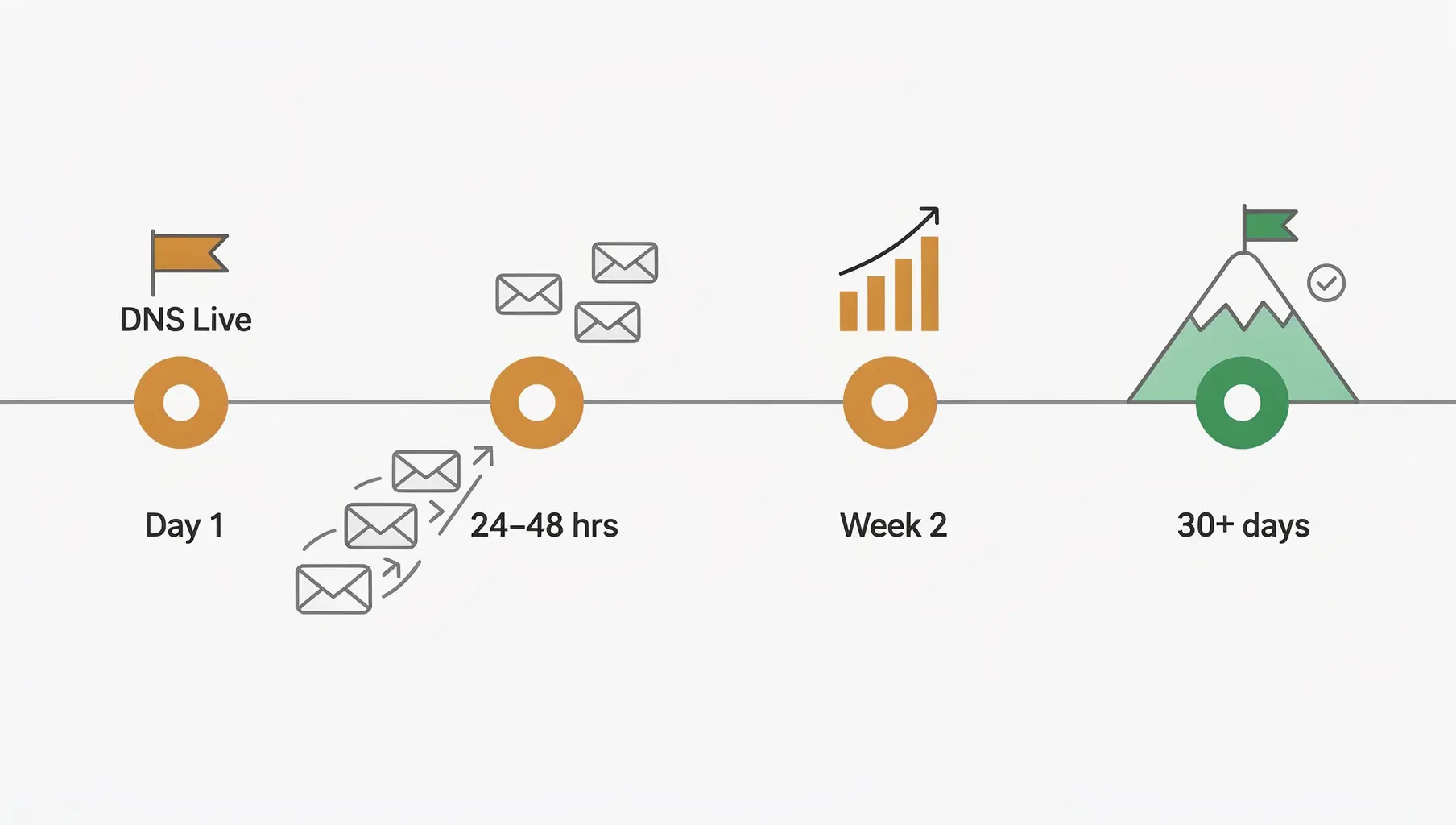
DMARC starts working as soon as your DNS record propagates, typically within a few hours. Reports arrive within 24-48 hours after email is sent and received. The full picture—understanding your email ecosystem—takes 1-2 weeks of data collection.
Here’s what to expect at each stage.
Timeline Overview
| Milestone | Timeline |
|---|---|
| DNS propagation | Minutes to 24 hours |
| First reports arrive | 24-48 hours |
| Meaningful data | 1-2 weeks |
| Ready for policy change | 2-4 weeks minimum |
| Full enforcement | 2-6 months |
Stage 1: DNS Propagation
After you add your DMARC record:
_dmarc.yourdomain.com TXT "v=DMARC1; p=none; rua=mailto:[email protected];"How long: Usually 15 minutes to 4 hours. Can take up to 48 hours in rare cases.
What’s happening: DNS resolvers around the world cache records for a TTL (time-to-live) period. As caches expire, they fetch your new record.
How to check: Use DNS lookup tools that query from multiple locations. When most locations see your record, you’re propagated.
What can go wrong:
- Typos in the record (fix them, wait again)
- Record at wrong location (must be
_dmarc.yourdomain.com, not justyourdomain.com) - DNS provider delays (some have propagation queues)
Stage 2: First Reports
Once propagated, receivers can see your DMARC record and will send reports.
How long: 24-48 hours after email is sent
What’s happening:
- Email is sent from/as your domain
- Receiving server checks your DMARC record
- Receiver logs the authentication result
- Receiver compiles daily report
- Report is emailed to your RUA address
What to expect:
- Google/Microsoft: Daily reports, usually arriving overnight
- Yahoo/Comcast: Daily reports
- Some providers: Weekly reports
What can go wrong:
- Reports going to spam (check junk folder)
- Typo in RUA address (no reports will arrive)
- No email sent (no reports generated)
- External reporting without authorization record
If you’ve set up correctly and sent email to major providers, you should see reports within 2 days.
Stage 3: Meaningful Data
Initial reports show you something, but patterns emerge over time.
How long: 1-2 weeks
What you’re looking for:
- All your legitimate sending sources appearing
- Consistent pass rates from known senders
- Any unexpected failures or unknown IPs
Why it takes time:
- Weekly emails haven’t been sent yet
- Monthly campaigns haven’t run
- Different senders have different schedules
- Some providers report weekly, not daily
Tip: Don’t make policy decisions based on 2 days of data. Wait until you’ve seen at least one full week, ideally two.
Stage 4: Ready for Policy Change
Before moving from p=none to p=quarantine:
How long: 2-4 weeks minimum, often longer
What you need:
- All legitimate senders identified
- SPF/DKIM configured for major senders
- Pass rate above 90% (ideally higher)
- No critical business email failing
Why rushing is dangerous:
- You might not have seen all your senders yet
- That quarterly newsletter hasn’t been sent
- New employee set up a tool that sends email
- Seasonal campaigns aren’t in the data
The goal isn’t speed—it’s completeness.
Stage 5: Full Enforcement
Reaching p=reject with confidence:
How long: 2-6 months total (sometimes longer)
Typical path:
p=nonefor 2-4 weeks (monitor)p=quarantine; pct=10;for 1-2 weeks- Gradually increase pct to 100
p=quarantinefull for 2-4 weeksp=reject; pct=10;for 1-2 weeks- Gradually increase to
p=reject; pct=100;
What affects timeline:
- Complexity of your email ecosystem
- How quickly you can configure third-party senders
- Whether you have legacy systems
- Your risk tolerance
Simple domains (one email provider, no third parties) can reach enforcement in weeks. Complex organizations take months.
Common Questions
”I added DMARC yesterday but haven’t received any reports”
Normal. Wait 48 hours. Check:
- Is the DNS record visible?
- Is your RUA address correct?
- Did you send email that would generate reports?
- Is your spam folder catching reports?
”I see some reports but not from Google/Microsoft”
Both send daily reports. If you’re not getting them:
- Emails aren’t reaching Gmail/Microsoft recipients
- Reports are being filtered
- Volume is very low (minimal data to report)
“Can I speed up DNS propagation?”
Not really. You can:
- Use a lower TTL before making changes (plan ahead)
- Verify propagation from multiple locations
- Clear your local DNS cache for testing
But the internet’s DNS infrastructure propagates on its own schedule.
”My policy changed—when does it take effect?”
Immediately upon propagation. There’s no grace period. This is why you should:
- Test at
p=nonefirst - Use
pct=to limit impact - Monitor closely after changes
”Reports show failures from weeks ago—is that normal?”
Reports cover the receiver’s date range, typically 24 hours. Some providers batch reports or have delays. Old data in reports is normal when you’re first starting.
Realistic Expectations
Don’t expect:
- Instant reports (it takes 24-48 hours minimum)
- 100% pass rate immediately (there’s always something to fix)
- All senders to appear in the first week
Do expect:
- Gradual data accumulation
- Surprises (senders you forgot about)
- Iteration (configure, monitor, adjust)
DMARC is a process, not an event. The organizations that reach enforcement successfully are the ones who take time to understand their email before enforcing policies.
Checklist: First 30 Days
Day 1:
- Add DMARC record with
p=none - Verify DNS propagation
Days 2-3:
- First reports should arrive
- Check spam folder if not
Week 1:
- Review initial reports
- Identify known senders
- Note any obvious failures
Weeks 2-4:
- Configure DKIM for third-party senders
- Fix obvious SPF issues
- Continue monitoring
- Don’t touch policy yet
After Week 4:
- Assess pass rates
- Identify remaining issues
- Consider policy progression if ready
For detailed guidance on reading your reports, see Understanding DMARC Reports.
Verkh tracks your DMARC progress and tells you when you’re ready for policy changes. Start your timeline at verkh.io.
Related Articles
November 2025
DMARC for Subdomains: Do You Need Separate Records?
Learn how DMARC handles subdomains, when you need separate records, and how to use the sp= tag to control policy.

January 2026
DMARC Record Not Found: Causes and How to Fix It
Fix 'no DMARC record found' errors. Covers DNS issues, syntax errors, propagation delays, and external domain permissions.
December 2025
DMARC Alignment Explained Simply
DMARC alignment determines whether SPF and DKIM results count. Learn relaxed vs strict alignment and when each matters.
Ready to implement this?
Verkh helps you monitor DMARC, identify issues, and reach enforcement. Start free.
Start Free