DMARC Alignment Explained Simply
DMARC alignment determines whether SPF and DKIM results count. Learn relaxed vs strict alignment and when each matters.
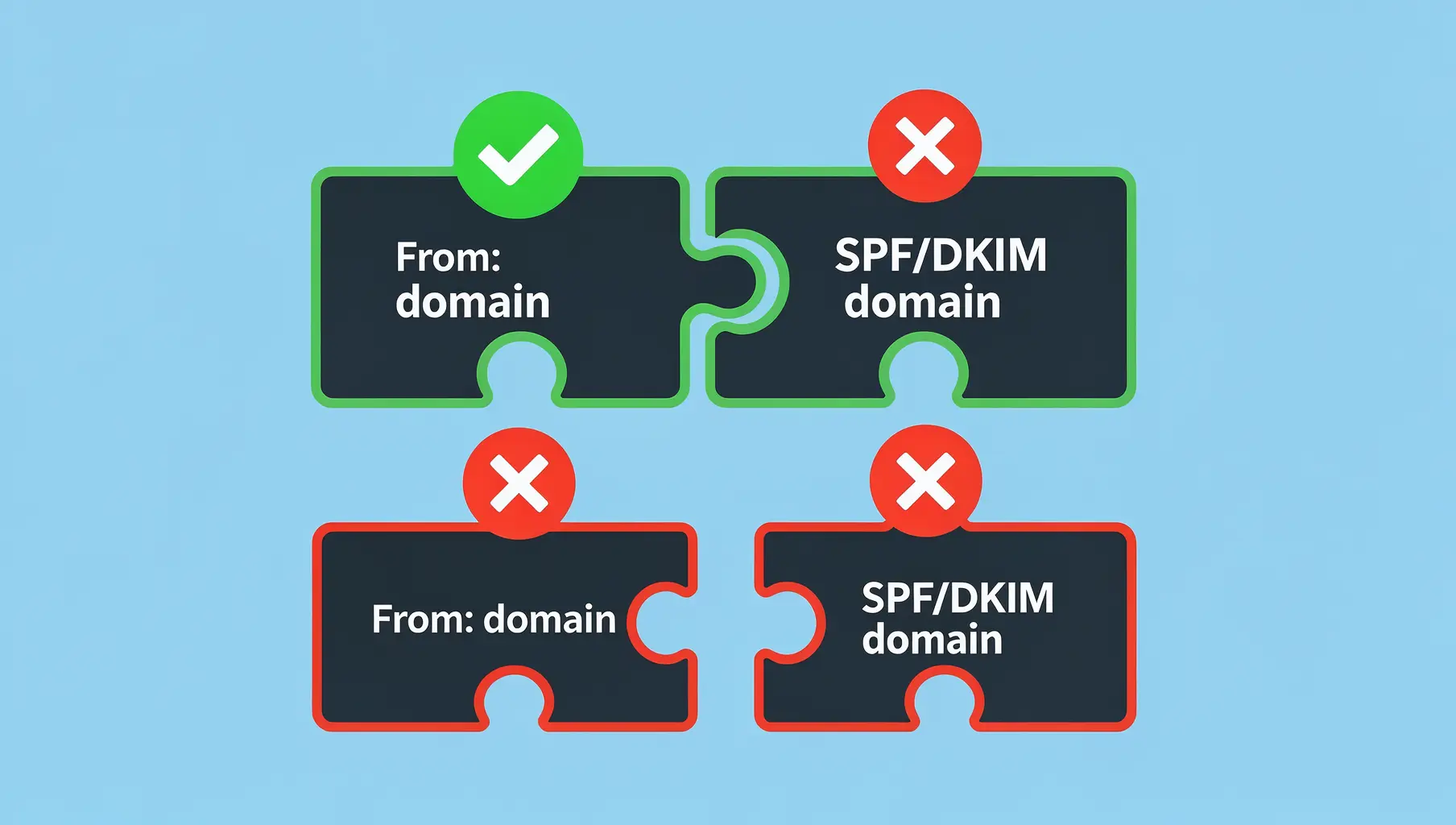
DMARC alignment checks whether the domain that passed SPF or DKIM matches your From address. If there’s no match, passing SPF or DKIM doesn’t count—DMARC still fails.
This trips up a lot of people. They set up SPF correctly, DKIM is passing, but DMARC keeps failing. The culprit is almost always alignment.
Why Alignment Exists
DMARC was designed to stop domain spoofing. Without alignment, an attacker could:
- Send email with
From: [email protected](your domain) - Use their own server that passes SPF for
attacker.com - Sign with DKIM for
attacker.com
SPF passes. DKIM passes. But neither one actually validates your domain. Alignment closes this gap by requiring the authenticated domain to match what recipients see.
How Alignment Works
Every email has multiple “from” addresses:
- Header From — What recipients see in their email client (
From: [email protected]) - Envelope From — Used for SPF checks (also called Return-Path or MAIL FROM)
- DKIM d= domain — The domain in the DKIM signature
DMARC alignment compares:
- SPF alignment: Does the Envelope From domain match the Header From domain?
- DKIM alignment: Does the DKIM d= domain match the Header From domain?
You only need ONE to align. If either SPF or DKIM aligns with the Header From, DMARC passes.
Relaxed vs. Strict Alignment
DMARC supports two alignment modes:
Relaxed Alignment (Default)
Relaxed alignment matches the organizational domain. Subdomains count as matching their parent:
| Header From | SPF/DKIM Domain | Aligned? |
|---|---|---|
| [email protected] | mail.company.com | ✅ Yes |
| [email protected] | company.com | ✅ Yes |
| [email protected] | company.com | ✅ Yes |
The DMARC record for relaxed alignment:
v=DMARC1; p=none; aspf=r; adkim=r;The r stands for relaxed. Since it’s the default, you can omit these tags entirely.
Strict Alignment
Strict alignment requires exact domain matches:
| Header From | SPF/DKIM Domain | Aligned? |
|---|---|---|
| [email protected] | mail.company.com | ❌ No |
| [email protected] | company.com | ✅ Yes |
| [email protected] | company.com | ❌ No |
The DMARC record for strict alignment:
v=DMARC1; p=none; aspf=s; adkim=s;The s stands for strict.
Real-World Alignment Problems
Problem 1: Third-Party Senders
When Mailchimp sends your newsletter, the email might have:
- Header From:
[email protected] - Envelope From:
bounce.mailchimp.com(for tracking bounces) - DKIM d=:
yourcompany.com(if you set up custom authentication)
SPF passes for mailchimp.com, but that doesn’t align with yourcompany.com. SPF alignment fails.
DKIM passes for yourcompany.com (assuming you configured it). DKIM alignment passes.
Result: DMARC passes via DKIM alignment. This is why configuring DKIM with third-party senders matters more than SPF.
Problem 2: Email Forwarding
When email gets forwarded:
- Header From:
[email protected](unchanged) - Envelope From:
[email protected](changed by forwarding) - DKIM: Usually intact if not modified
SPF alignment breaks because the envelope changed. DKIM alignment usually survives (unless the forwarder modifies the message body).
Problem 3: Subdomains with Strict Alignment
If you use strict alignment and send from marketing.company.com but your DKIM signs as company.com, alignment fails. Strict mode requires the subdomain in DKIM to match exactly.
Checking Alignment in DMARC Reports
DMARC aggregate reports show alignment results for every message. In the XML, look for:
<policy_evaluated>
  <disposition>none</disposition>
  <dkim>pass</dkim>
  <spf>fail</spf>
</policy_evaluated>
<auth_results>
  <dkim>
    <domain>yourcompany.com</domain>
    <result>pass</result>
  </dkim>
  <spf>
    <domain>thirdparty.com</domain>
    <result>pass</result>
  </spf>
</auth_results>
Notice SPF passed for thirdparty.com but the policy evaluation shows spf>fail. That’s an alignment failure—SPF authenticated the wrong domain.
Verkh parses these reports automatically and shows you which senders have alignment issues, so you don’t have to dig through XML.
Which Alignment Mode Should You Use?
Start with relaxed alignment. It’s the default for good reasons:
- Works with subdomains without extra configuration
- More resilient to forwarding
- Handles most third-party sender setups
Consider strict alignment only if:
- You have regulatory requirements mandating it
- You’ve audited every sender and confirmed exact domain matches
- You understand it will break forwarding and some third-party setups
Most organizations never need strict alignment. The security benefit is marginal compared to the operational headaches.
Fixing Alignment Issues
If DMARC is failing due to alignment:
-
Check your DKIM setup — Most third-party senders support custom DKIM domains. Configure them to sign as your domain, not theirs.
-
Review your sending sources — Use DMARC reports to identify which senders have alignment problems.
-
Don’t rely on SPF alignment for third parties — Third-party senders typically can’t use your domain for envelope from. Focus on DKIM.
-
Test before enforcing — Stay at
p=noneuntil alignment issues are resolved.
For a deeper dive into DMARC reports and what they tell you, see our Complete Guide to Understanding DMARC Reports.
Verkh automatically identifies alignment failures in your DMARC reports and shows which senders need attention. Start monitoring free at verkh.io.
Related Articles
December 2025
Third-Party Senders and DMARC: The Complete Guide
ESPs, CRMs, and marketing platforms send as your domain. Learn how to configure DMARC for third-party senders properly.
March 2026
How to Set Up DMARC for Klaviyo
Step-by-step guide to configuring SPF, DKIM, and DMARC for Klaviyo email marketing. Includes DNS records and troubleshooting.

January 2026
How to Ensure Your Emails Are Authenticated and Reach the Inbox
A practical guide to setting up SPF, DKIM, and DMARC so your emails actually get delivered. No fluff, just the steps that matter.
Ready to implement this?
Verkh helps you monitor DMARC, identify issues, and reach enforcement. Start free.
Start Free