Why Email Forwarding Breaks DMARC (And What You Can Do)
Email forwarding is the most common cause of legitimate DMARC failures. Learn why it happens and how to handle it.
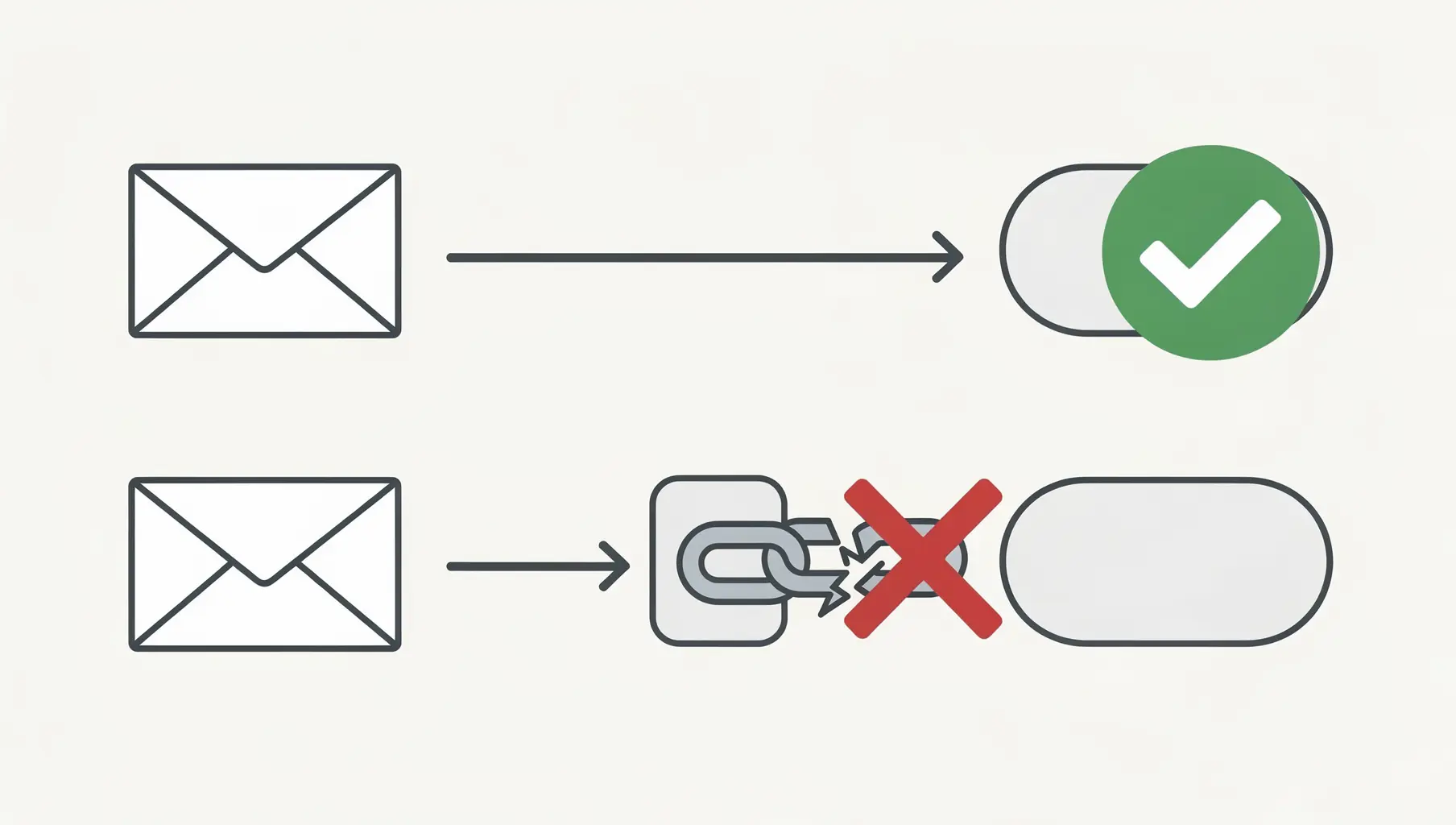
Email forwarding breaks DMARC because it changes the envelope sender and often modifies the message. SPF fails because the forwarding server isn’t in your SPF record. DKIM fails if the forwarder alters the message body. With both failing, DMARC fails—even though the original email was legitimate.
This is the most common cause of unexpected DMARC failures, and it’s largely outside your control. Understanding why it happens helps you interpret your reports correctly and set realistic expectations.
How Email Normally Works
Before forwarding enters the picture:
- You send email from
[email protected] - Your server is in your SPF record ✓
- You sign with DKIM for
company.com✓ - The recipient’s server checks SPF and DKIM
- Both align with the From address
- DMARC passes ✓
What Happens When Email Gets Forwarded
Here’s where it breaks down:
- You send email to
[email protected] - Your email passes SPF and DKIM at University’s server
- Colleague has forwarding set up to
[email protected] - University’s server forwards the email to Gmail
- Gmail receives email claiming to be from
[email protected]… - …but it came from University’s server (not in your SPF)
- SPF fails—University’s server isn’t authorized for your domain
If DKIM survives, you might still pass DMARC. But often:
- University’s server adds a footer: “Forwarded from university.edu”
- This modifies the message body
- DKIM signature is now invalid
- DKIM fails
- DMARC fails—both SPF and DKIM failed
The original email was legitimate. The forwarding was legitimate. DMARC still fails.
Why SPF Always Fails on Forwarded Email
SPF checks the server that delivered the email, not the server that originated it. When email is forwarded:
- Original delivery: Your server → Recipient’s server (SPF passes)
- Forwarded delivery: Forwarder’s server → Final destination (SPF fails)
The forwarding server isn’t in your SPF record—and shouldn’t be. You can’t add every possible forwarding server to your SPF (you’d hit the 10 lookup limit immediately, and you don’t know which servers might forward your email).
SPF and forwarding are fundamentally incompatible. This is a known limitation of SPF, which is why DKIM matters so much. Learn more about common DKIM mistakes to avoid.
Why DKIM Sometimes Survives
DKIM signs the message content. If the message isn’t modified, the signature remains valid regardless of which servers it passes through.
DKIM survives forwarding when:
- The forwarder doesn’t modify the message body
- Headers included in the signature aren’t changed
- The message isn’t re-encoded
DKIM breaks when forwarders:
- Add footers (“Sent via University Mail”)
- Modify subject lines (“[FWD]” prefix)
- Re-encode attachments
- Add or remove headers
Modern forwarders are increasingly DKIM-aware and try to preserve signatures, but there’s no guarantee.
Identifying Forwarding in DMARC Reports
Forwarded email has telltale patterns in your DMARC reports:
Signs of forwarding:
- SPF fails but the IP belongs to a legitimate mail provider (not a random server)
- The source IP is a university, ISP, or email service known for forwarding
- You see email providers you’ve never sent to directly
- Patterns of failures from specific IP ranges
In the raw XML, forwarded mail often looks like:
<record>
  <row>
    <source_ip>128.59.x.x</source_ip>  <!-- Columbia University -->
    <count>12</count>
    <policy_evaluated>
      <dkim>fail</dkim>
      <spf>fail</spf>
    </policy_evaluated>
  </row>
</record>
If you’re seeing failures from university IP ranges, large ISPs, or email hosting providers you don’t directly use, forwarding is the likely cause.
Verkh identifies probable forwarding patterns in your reports automatically, so you don’t have to manually research IP addresses.
What You Can Do About It
1. Accept That Some Failure Is Normal
A 100% pass rate isn’t realistic if any of your recipients forward email. When planning your policy progression:
- Expect 2-5% of email to fail due to forwarding
- Don’t let forwarding failures prevent you from reaching
p=reject - Focus on fixing controllable failures (misconfigured senders) first
2. Make Sure DKIM Is Rock Solid
Since SPF will fail on forwarded email, DKIM is your only chance at passing DMARC. Ensure:
- DKIM is enabled for all legitimate sending sources
- Keys are properly configured and valid
- You’re signing with your domain (not the third party’s domain)
If DKIM passes and aligns, forwarded email passes DMARC even though SPF fails.
3. Understand Receiver Behavior
Major email providers know about the forwarding problem. They may:
- Apply policy less strictly to obviously forwarded mail
- Use additional signals beyond DMARC (sender reputation, content analysis)
- Honor ARC (Authenticated Received Chain) headers from trusted forwarders
This doesn’t mean you should ignore forwarding failures, but it does mean p=reject won’t necessarily block all forwarded legitimate email.
4. Monitor, Don’t Panic
When you see DMARC failures:
- Check if the source IP is a known forwarder
- Look for patterns (same IP range, consistent low volumes)
- Distinguish forwarding from actual spoofing
Spoofing attempts typically come from random IPs, in bursts, with high volumes. Forwarding shows consistent patterns from recognizable sources.
ARC: The Forwarding Solution (Sort Of)
Authenticated Received Chain (ARC) is designed to solve the forwarding problem. Each server in the forwarding chain adds its own authentication, creating a chain of trust.
The idea:
- You send email (SPF ✓, DKIM ✓)
- First forwarder validates and adds ARC signature
- Second forwarder validates ARC, adds its own
- Final receiver can trust the chain even though direct SPF/DKIM fail
The reality:
- ARC adoption is growing but not universal
- Not all receivers check ARC
- Not all forwarders sign with ARC
- It helps but doesn’t completely solve the problem
You don’t need to do anything to benefit from ARC—it’s implemented by forwarders and receivers. But don’t count on it to eliminate forwarding failures.
Forwarding vs. Spoofing: How to Tell
| Characteristic | Forwarding | Spoofing |
|---|---|---|
| Source IPs | Known mail providers | Random/suspicious IPs |
| Volume | Low, consistent | High, bursty |
| Geography | Matches your recipients | Often foreign |
| Timing | Ongoing, predictable | Sudden campaigns |
| ASN | Legitimate providers | Hosting, bulletproof hosts |
When reviewing DMARC reports, categorize failures into these buckets. Forwarding is noise to monitor; spoofing is a threat to stop.
The Bottom Line
Email forwarding will cause DMARC failures. This is a known limitation, not a configuration problem. Your job is to:
- Ensure DKIM is properly configured (your main defense)
- Recognize forwarding patterns in reports
- Not let forwarding prevent policy progression
- Focus on fixing the failures you can control
Forwarding failures don’t mean your DMARC is broken. They mean email authentication has limitations—and you’re monitoring them correctly.
For more on interpreting your DMARC reports, see our Complete Guide to Understanding DMARC Reports. When you’re ready to move beyond monitoring, our enforcement guide walks you through the progression to p=reject.
Verkh automatically identifies forwarding patterns in your DMARC reports and separates them from authentication issues you can fix. See your forwarding analysis at verkh.io.
Related Articles
March 2026
How to Set Up DMARC for Klaviyo
Step-by-step guide to configuring SPF, DKIM, and DMARC for Klaviyo email marketing. Includes DNS records and troubleshooting.
January 2026
How to Ensure Your Emails Are Authenticated and Reach the Inbox
A practical guide to setting up SPF, DKIM, and DMARC so your emails actually get delivered. No fluff, just the steps that matter.
January 2026
5 Key Benefits of Adopting an Email Authentication Platform Today
Why SPF, DKIM, and DMARC matter for security, deliverability, and brand protection. A practical guide for businesses of all sizes.
Ready to implement this?
Verkh helps you monitor DMARC, identify issues, and reach enforcement. Start free.
Start Free